
SPRINGBIG'S SHARING LINKS
SEAMLESS WAYS TO GROW YOUR MEMBERSHIP
From the Sharing Links section, you have various options to get your customers/members to join your program. We will review each option in the next page, but this section requires special attention as it is one of the most important aspects of your platform. By offering these options to your customers, you are giving them an easy way to join and give you permission to reach out via text, email, etc.
Navigate to settings – account – sharing links
SHARING LINKS EXPLAINED
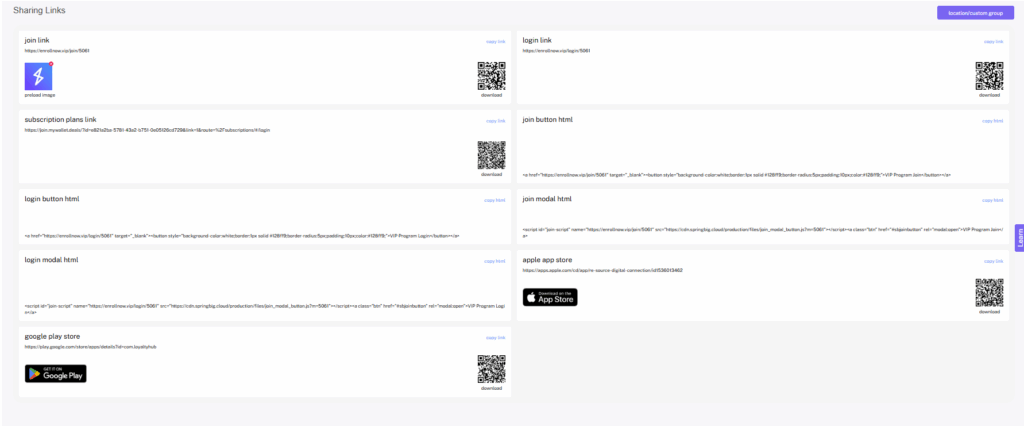
Springbig’s Sharing Links page is where you can find everything you need to share a join or login form for your customers to sign up and easily access their customer wallet.
- Join Link
- This section includes a URL, QR code, and 2 embed forms leading to a join form. The Join form requires phone number and signature, and can also include your interests and how did you hear about us list that will be covered in the group settings section. The Join form is great for new customers signing up, or to gain more information from existing customers.
- Tip: Reach out to the Springbig team if you would like to discuss customization options or the ability to make other fields mandatory on this form.
- Login Link
- This section includes a URL, QR code, and 2 embed forms leading to a login portal. The Login Portal allows existing customers to enter their phone number to access their customer wallet.
- URL – This is a copy paste link to your form. You can share this link via social media, email, etc.
- QR Code – Download this QR code to create custom marketing assets.
- Join / Login Button HTML – Here is a simple embed code for your site that will create a button that redirects to your form.
- Join / Login Modal HTML – The modal embed code for your website creates a pop-up window with the form. Your web developer will be able to determine with you which is best and potentially customize / edit the script if needed.
- App store links – Feature your custom Springbig app on your join form. Reach out to the Springbig team to set this up, which will allow you to access the URL, downloadable QR codes, and app store image.
Tip: Create urls, HTML, and QR codes for different locations / custom groups using the purple drop down box.
SHARING LINKS VIDEO
Check out this video reviewing the Sharing Links page and QR functionality.