Contact Cards
Overview
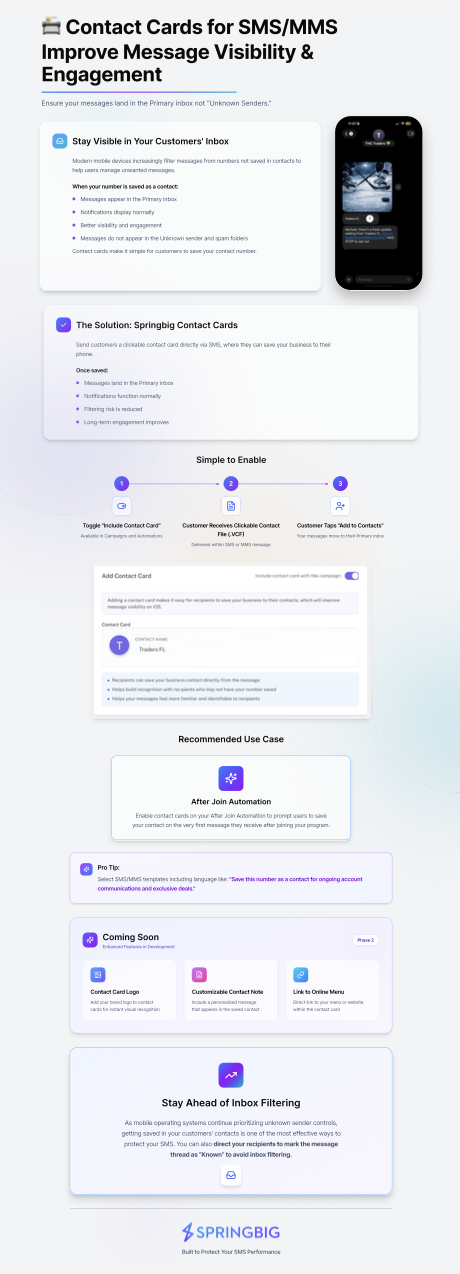
Springbig Contact Cards allow merchants to send a clickable contact file (.VCF) to customers directly within an SMS or MMS message.
When a customer taps the contact card, they can save your business phone number directly to their contacts. Once saved, your messages are more likely to appear in the Primary inbox instead of Unknown Senders, improving visibility and engagement.
As modern mobile devices increasingly filter messages from unknown numbers, encouraging customers to save your contact is one of the most effective ways to protect your SMS performance and maintain strong engagement.
Why Contact Cards Matter
Many mobile operating systems automatically filter messages from numbers that are not saved in a user’s contacts.
When your number is saved as a contact, several benefits occur:
• Messages appear in the Primary inbox
• Notifications display normally
• Messages avoid Unknown Sender filtering
• Message visibility and engagement improve
Contact Cards make it simple for customers to save your number with a single tap, ensuring your messages remain visible in their inbox.
How Contact Cards Work
Springbig Contact Cards are delivered as a downloadable contact file (.VCF) within an SMS or MMS message.
The process works as follows:
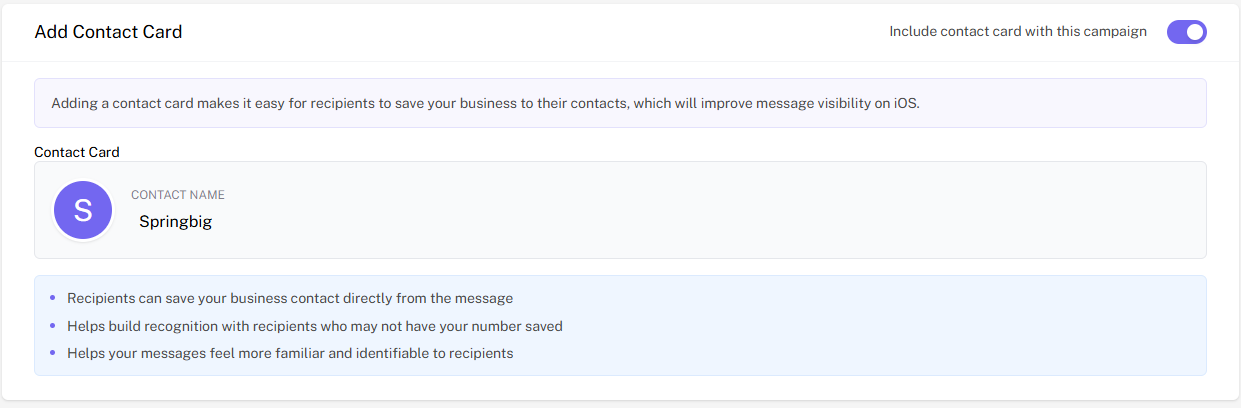
Step 1 — Enable Contact Cards
Within a campaign or automation, toggle Include Contact Card.
Contact Cards can be enabled in:
Campaigns
Automations
Step 2 — Customer Receives Contact File
The recipient receives your message along with a clickable contact card attachment (.VCF) delivered within the SMS or MMS message.
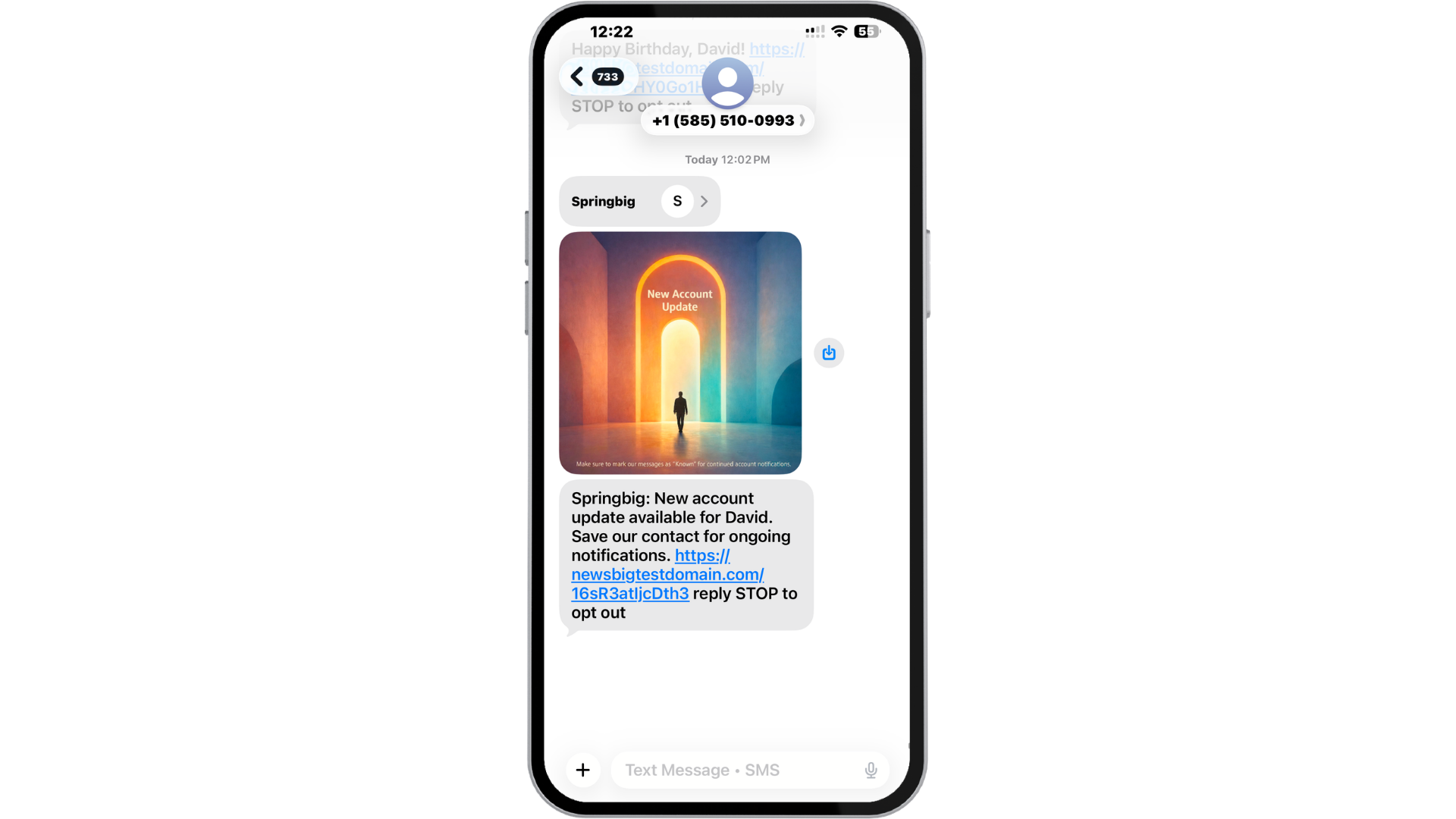
Step 3 — Customer Saves Your Contact
The customer taps Add to Contacts, saving your business phone number.
Once saved:
- Your messages appear in the Primary inbox
- Notifications function normally
- Filtering risk is reduced
- Long-term engagement improves
What's Included in a Springbig Contact Card
Each Springbig Contact Card is automatically generated using key business details to create a complete and recognizable contact for your customers.
Your contact card includes:
• 10DLC Approved Logo
Your approved brand logo is displayed within the contact card, helping customers easily recognize your business when saving the contact.
If you do not currently have a 10DLC-approved logo on file, you can submit one to your Customer Success Manager or Springbig Support team to have it added.
• Business Name
Your business name appears as the contact name, ensuring customers clearly identify who the message is coming from once the contact is saved.
• Online Menu Link
Your contact card includes a direct link to your online menu.
This link is automatically pulled from the Online Menu field located in the Basic Settings page within the Springbig platform. Keeping this link updated ensures customers always have quick access to your offerings.
• Notes Section (Save Contact Prompt)
Each contact card includes a pre-filled note designed to encourage customers to save your contact and improve message deliverability.
Default note:
Save this contact or mark this number as Known to ensure future messages arrive in your main inbox and don’t get filtered to Unknown Senders
If you would like to customize this note, you can request an update through your Customer Success Manager or the Springbig Support team.

Recommended Use Case
After Join Automation
The best place to enable Contact Cards is within your After Join Automation.
This ensures the first message a customer receives after joining your program prompts them to save your contact number.
Saving the number early in the relationship helps ensure all future messages are recognized and visible.
Best Practice: Include a Save Contact Prompt
When sending a message with a Contact Card, we recommend using SMS or MMS templates that encourage customers to save your number.
Example language:
Save this number as a contact for ongoing account communications and exclusive deals.
This simple prompt increases the likelihood that recipients will save the contact and prevent future message filtering.
Protecting Your SMS Deliverability
Mobile operating systems continue to introduce stronger filtering for messages sent from unknown numbers.
Getting your number saved in your customers’ contacts is one of the most effective ways to stay ahead of inbox filtering and maintain strong SMS visibility.
In addition to saving your contact, you can encourage customers to mark your message thread as “Known” to further reduce filtering risk.
Additional Resource
For a visual overview of how Contact Cards work, see the one-pager guide below: