
BUZZBOX BY SPRINGBIG
SPRINGBIG'S BOX-OF-THE-MONTH
This feature within our Subscriptions program turns your customers into VIP shoppers with a fun and exclusive monthly subscription experience. With BuzzBox, your VIP customers will get a special curated box every month, packed with awesome products that they’ll love. Each month, your subscribers will look forward to discovering a selection of items carefully chosen to delight and surprise them.
The BuzzBox is a versatile tool for retailers to showcase a variety of products. You can feature house brands you want customers to explore, spotlight new or popular products from partner brands, or even manage overstock by including customer favorites. This flexibility helps you maintain strong customer engagement and drive brand loyalty.
Setting up BuzzBox by Springbig is straightforward and seamless. Once the subscription program is active, retailers can create a monthly offer for the BuzzBox. This offer will appear in the digital wallets of VIP subscribers, allowing them to redeem it each month for their special curated box. Depending on your location and customer preferences, you can choose to either deliver the boxes directly to subscribers or have them available for pick-up in-store.
The BuzzBox not only helps build customer loyalty but also gives you a great chance to promote new products. By keeping the box contents fresh and exciting each month, you’ll keep your subscribers happy and eager to see what’s next.
STEPS TO SETTING UP BUZZBOX BY SPRINGBIG
Step 1. Ensure that the subscriptions feature is enabled in your account.
- If it isn’t or you’d just like to learn more, please reach out to your contact at Springbig or put in a support ticket.
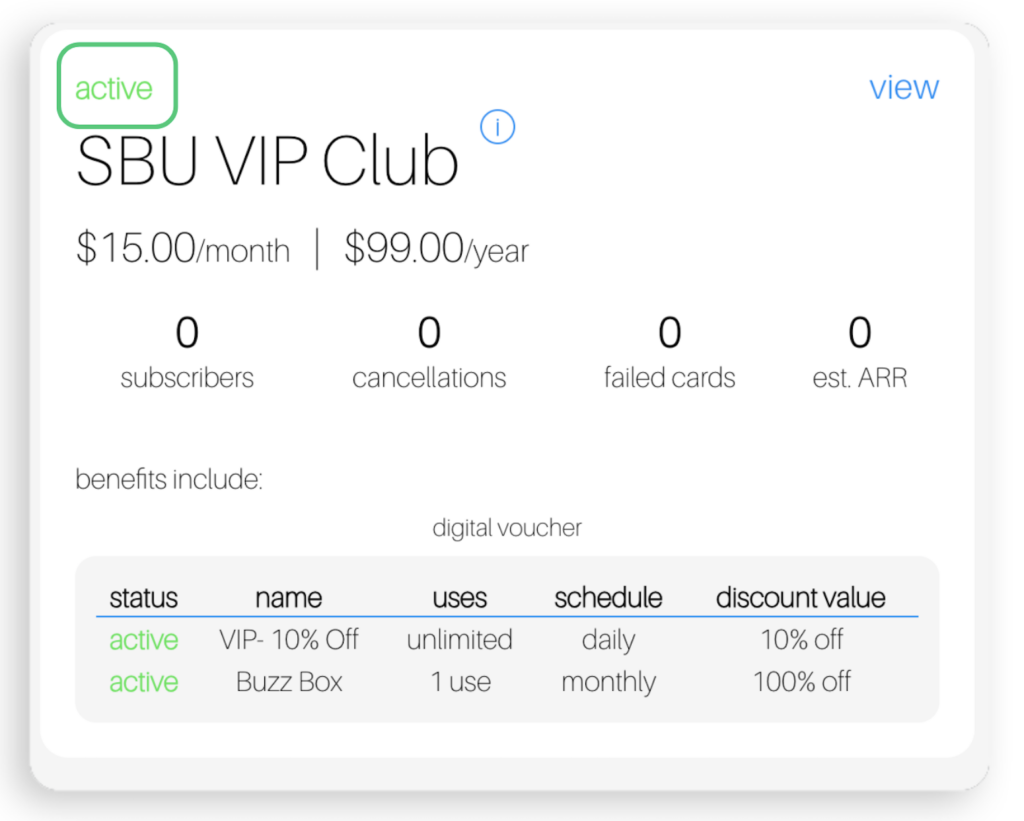
Step 2: Create a monthly offer within your subscriptions program for the BuzzBox.
- Feel free to rename this Box-of-the-Month offering to fit your subscription program.
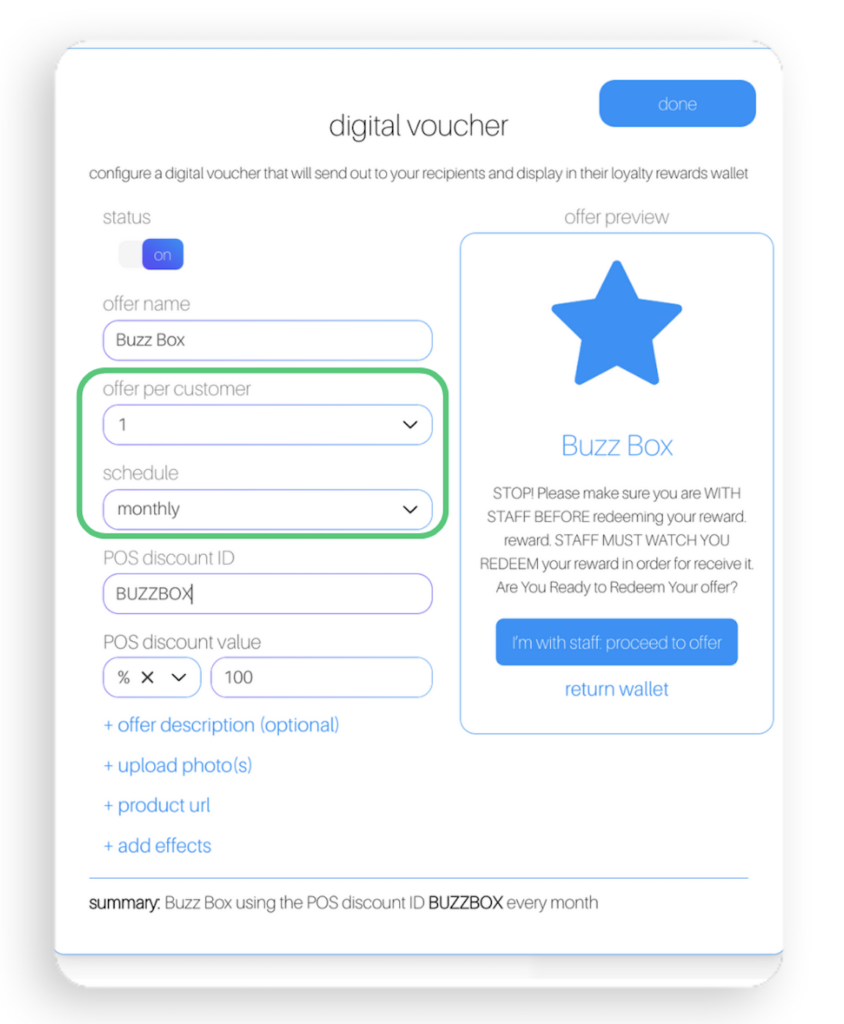
Step 3: Ensure that this offer is set up with the following:
- Offer per customer: 1
- Schedule: Monthly
TIPS & TRICKS
Add Extra Info
Feel free to include general information about what’s included in the box-of-the-month. Just remember not to get too specific since the same offer goes out every month and the contents of the box will change monthly.
Delivery Details
- Make sure to mention when and how your subscribers can get their box each month. Clear instructions make the process smooth and easy for everyone.
- Depending on your location, decide whether to deliver the boxes or have customers pick them up in-store. Choose what works best for you and your subscribers.
Keep it Fresh
- Once your offer is set up, focus on selecting great products and accessories for the boxes. Make sure you have enough for all your subscribers.
Personal Touch
- Add a little extra flair to your boxes. Whether it’s a thank-you note, a sneak peek of next month’s goodies, or some branded swag, small touches can make a big difference.
IDEAS FOR ITEMS TO INCLUDE IN YOUR STORE'S BUZZBOX
House Brand Products
Introduce your customers to new and exclusive items.
Partner Brands
Promote products from brands you are collaborating with.
Customer Favorites
Include popular items that your customers love.
Seasonal Products
Add items that are relevant to the current season or upcoming holidays.
Exclusive Merchandise
Offer branded merchandise or limited-edition accessories.