
SPRINGBIG'S BASIC SETTINGS
MANAGE YOUR ACCOUNT WITH EASE
From within Basic Settings, you’ll be able to set your profile details, update your address, email and other contact details. You’ll also be able to add your logo, and create a wallet homescreen icon for your customers/members. You’ll also add your privacy policy link and terms & conditions to your join form.
Navigate to settings – account – basic settings
BASIC SETTINGS EXPLAINED
View the basic settings page below!
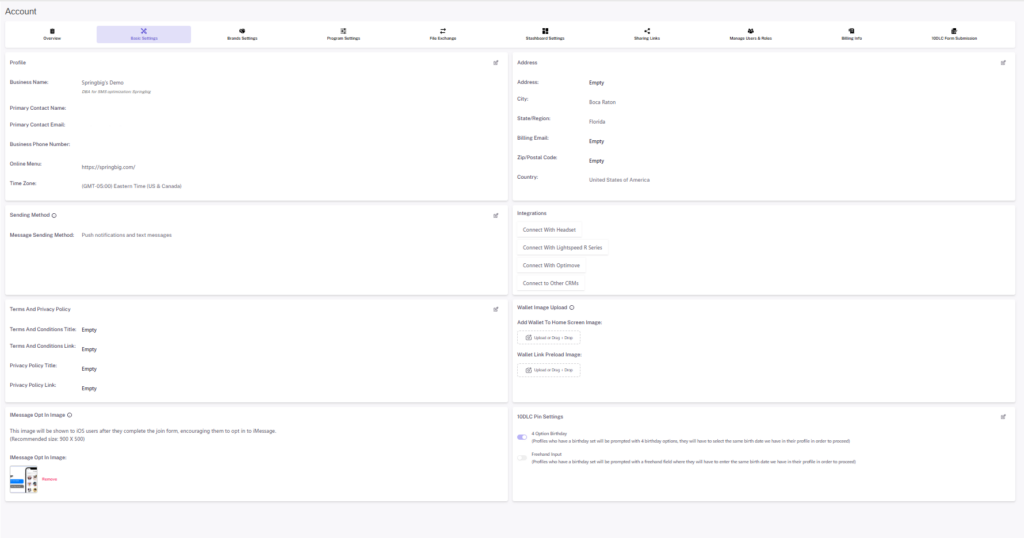
Profile:
The fields on this page are auto populated from the information provided in the contract. You can update most details at any point on your own via this section.
Pro-tips:
Business name: If any changes need to be made to the business name, please let your onboarding specialist, CSM or Account Manager know.
DBA for SMS optimization: This is how your business name will appear when you send out a text notification. If your business name has cannabis content, this DBA has been optimized to exclude cannabis content.
Business website: If a URL is placed in this field, a shopping cart icon will be added to the customer’s wallet. If no URL is present, the shopping cart button/icon will not be present on the wallet.
Address:
Update your address details as needed in this section. Click on the edit link to start editing. Address will appear in your email footer for clients.
Terms and Privacy Policy:
Links added to either terms or privacy policy will be displayed in your join form.
Wallet Image Upload:
At the top of this section where it says, ‘add wallet to home screen image’, please upload your logo. Suggested dimension is 150 x 150. You can repeat the same for ‘wallet link preload image’. This will appear when customers save your wallet as an icon on their phone.
Additional Sections:
Depending on your platform setup, you may see additional sections for compliance messaging, 10DLC, etc.
BASIC SETTINGS VIDEO
TEXT FRIENDLY NAME
Your merchant account will be set up under your business name, which may include prohibited content. If your business name can be tracked back to cannabis or prohibited content, it will cause your messages to be flagged for spam and negatively impact your delivery.
Springbig will set up a DBA / text friendly name that will send with your SMS messages that is void of prohibited content that may be filtered.
Under basic settings in your platform, you will see ‘dba for sms optimization: ___’ – this is your text friendly name that will appear in your messages. This name is set up prior to your first campaign being sent and may be changed based on request or depending on messaging trends.
Reach out to the Springbig team with any questions.
IMAGE SIZE GUIDE
Click here to view a guide showing recommended dimensions and file types for images on the platform.