
SPRINGBIG'S PROGRAM SETTINGS

FINE-TUNE YOUR LOYALTY PROGRAM​

Program Settings is where you will:

  • Enable your loyalty program
  • Set your loyalty points
  • Enable bonus points based on specific parameters
  • Expire your points.

If you are running loyalty with us, this is where you set the point value and accrual rate for your loyalty program. You can decide between points per dollar (PPD) or points per visit (PPV), and set an expiration date for your customer’s loyalty points. 

If you are not running loyalty, no worries, this setting can be disabled.

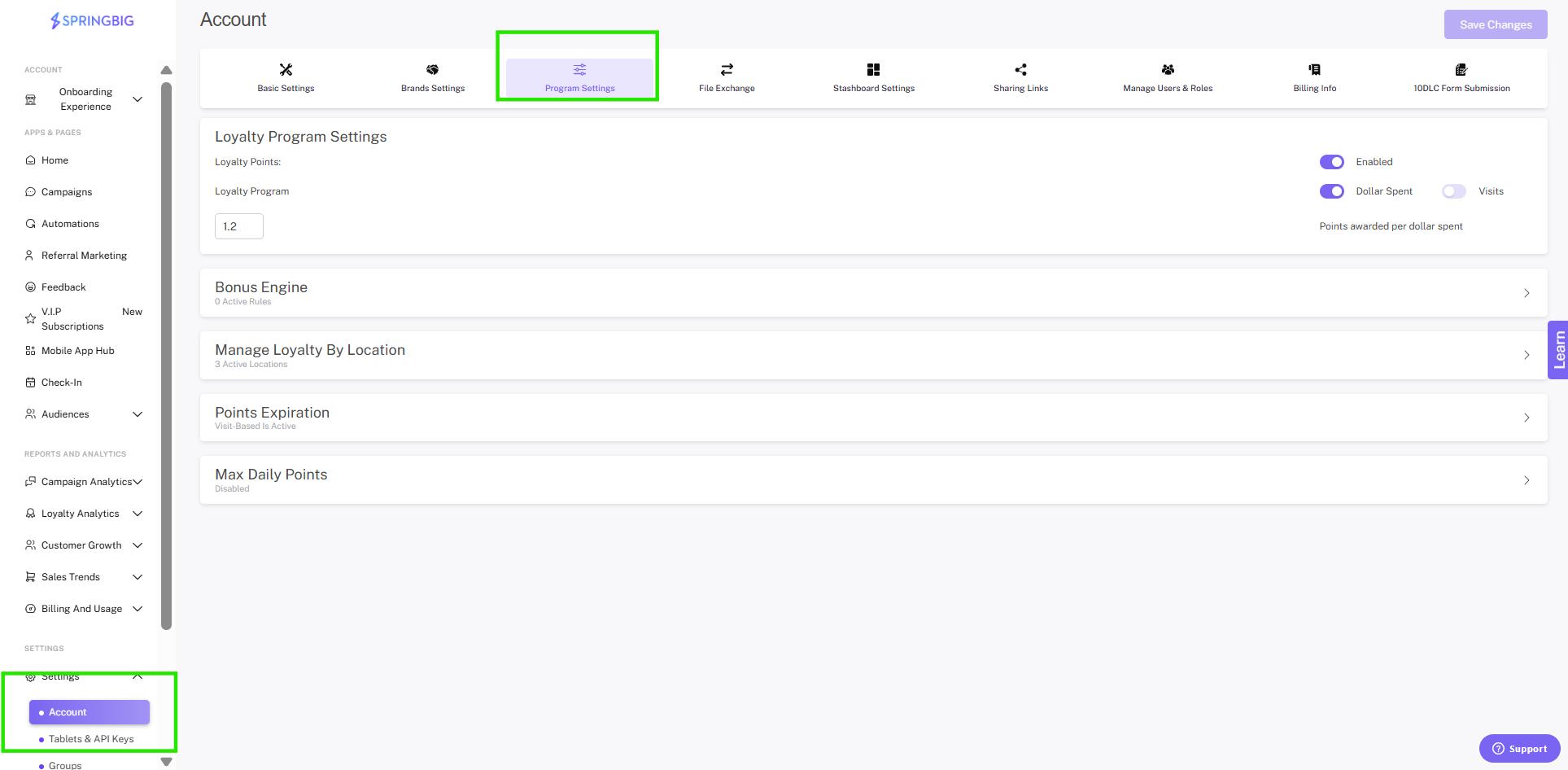
Navigate to settings – account – program settings

Important: Do not enable Loyalty until you are fully prepared for customers to begin earning points. Once Loyalty is activated and integrated with your POS, point accrual will begin immediately for all eligible transactions.

BENEFITS OF A LOYALTY PROGRAM

  • Build Customer Loyalty at Your Dispensary
    • Loyalty programs increase customer acquisition and maximize revenue and customer loyalty among program members with reward points that can be redeemed for exclusive deals and discounts. 
    • Increase engagement from loyalty program members and optimize their experience both in-store and out using our full suite of tools to create a custom cannabis loyalty program at your dispensary.

  • Reward your members for every dollar they spend!
    • These types of loyalty programs do away with the outdated ‘check-in’ system. Instead of rewarding customers based on visit frequency, customers earn points for every dollar spent. Rewards programs that offer a point for every dollar spent create an incentive for loyal consumers to spend more on every visit. 
    • As points accumulate, customer retention increases. This type of dispensary loyalty program maximizes revenue instead of just focusing on how many times a customer visits.

  • Create a tiered loyalty program
    • Using customer data available in the Springbig platform, you can create multiple tiers in your loyalty program based on a variety of KPIs such as visit frequency average purchase size, or total spent.
    • Tiers encourage long-term customer loyalty and encourages repeat business as customers seek to take advantage of everything your loyalty program has to offer.

  • POS integration creates a seamless experience for you!
    • Don’t worry about handling two systems, keep track of all rewards, deals, discounts, and customer point balances within your POS!

  • One more reason to reach out
    • Members often forget about loyalty programs shortly after enrolling, but with a text marketing engine you can keep your loyalty program top of mind! Plus, text marketing allows you to also create a VIP experience for your loyalty members. Reach out with special “members only” deals, a secret loyalty only menu, curated events just for your loyalty members, and more.

PROGRAMS SETTINGS VIDEO

BONUS ENGINE VIDEO

POINT EXPIRATION GUIDE

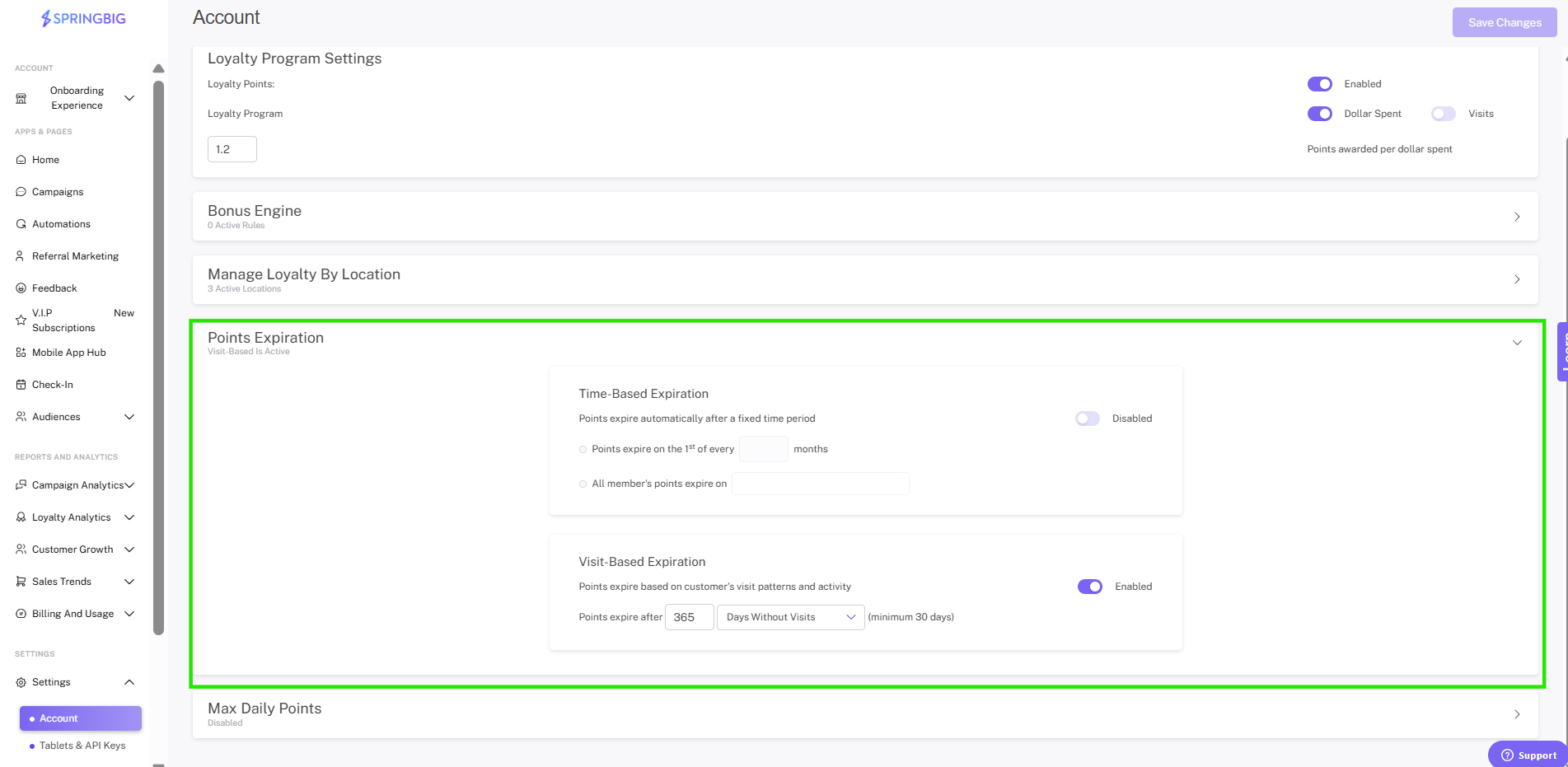
The points expiration setting allows merchants to determine whether member points expire based on time or based on visits. 

For time-based expiration, there are two options: 

  1. Points expire on the 1st of every ____ month(s)
  2. All member’s points will expire on ____.

For visit-based expiration, there are also two options: 

  1. Number of days without visit until points expiration (30 days minimum)
  2. Number of days since visit until points removed from balance (30 days minimum).

To configure your points expiration settings, from the program settings page click the points expiration dropdown and select either time-based or visit-based points expiration.

Step 1: Navigate to your program settings

  • From the main menu, open the settings dropdown, then select account. From the account page select the program settings option.
Step 2: Open the points expiration settings and select time based or visit based expiration:
 

Time-Based Expirations

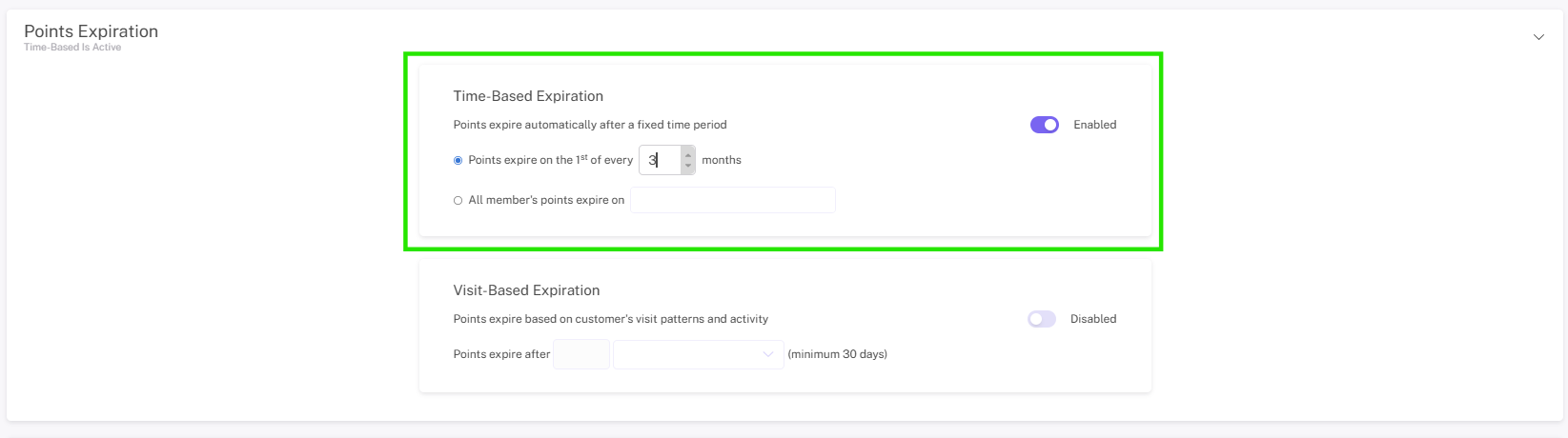
Sets points to expire on the first of every x months, or sets points to expire on a specific date. 

If you select time based you will be prompted to select one of two options:

  1. Points expire on the 1st of every ____ month(s)

  • (___ month(s) being how long until the points expire starting from when you configure the setting), setting enables retailers to set points to expire, for example 12 months after they configure the setting.
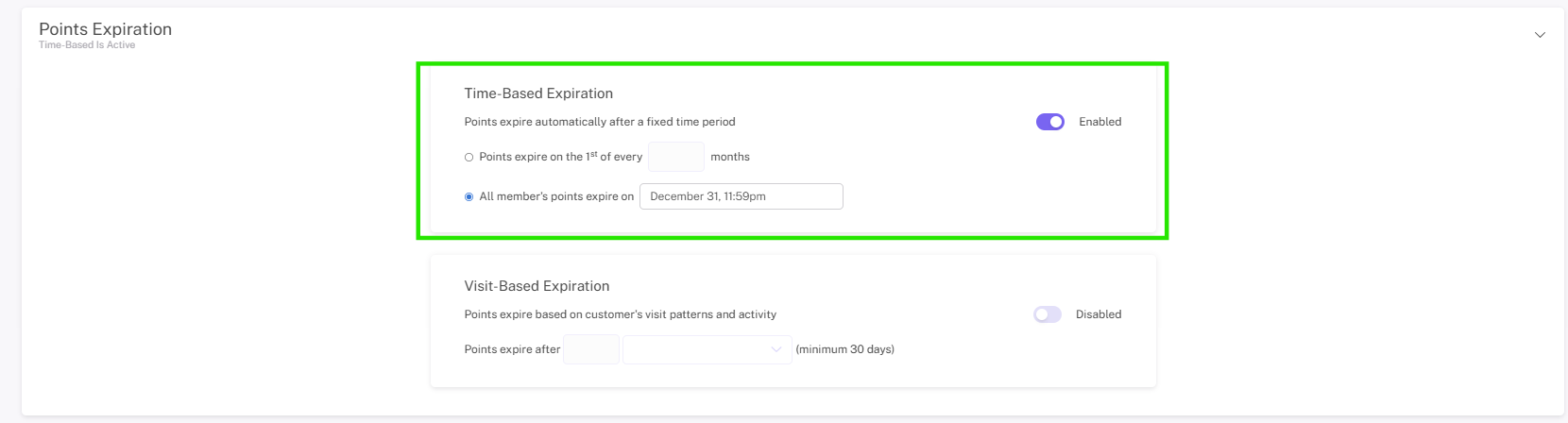
2. All member’s points will expire on ____.

  • All member’s points will expire on ____, setting allows retailers to configure points to expire on a specific date for all members. That means a retailer could set points to expire all at the same time on December 31st.

Visit-Based Expirations

This sets points to expire after a member has gone a certain number of days without visiting your dispensary. 

If you select visit based you will be promoted to select one of two options:

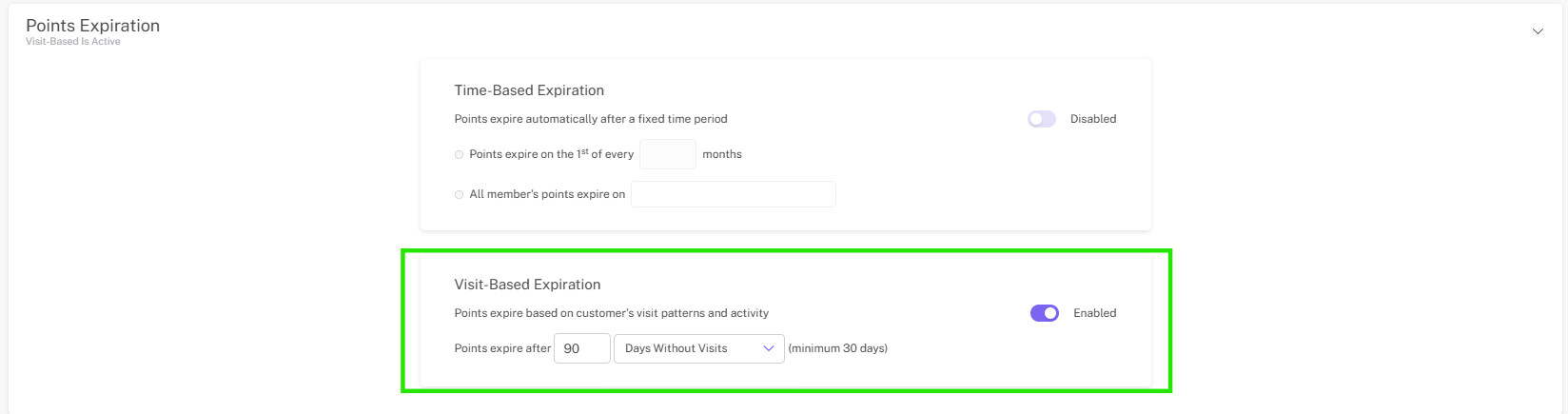
  1. Number of days without visit until points expiration (30 days minimum)

  • Number of days without visit until points expiration (30 days minimum): This option allows retailers to configure points to expire after the member has not visited for x amount of days.

    Days without visit = All member’s points will expire if they do not make a visit in X days
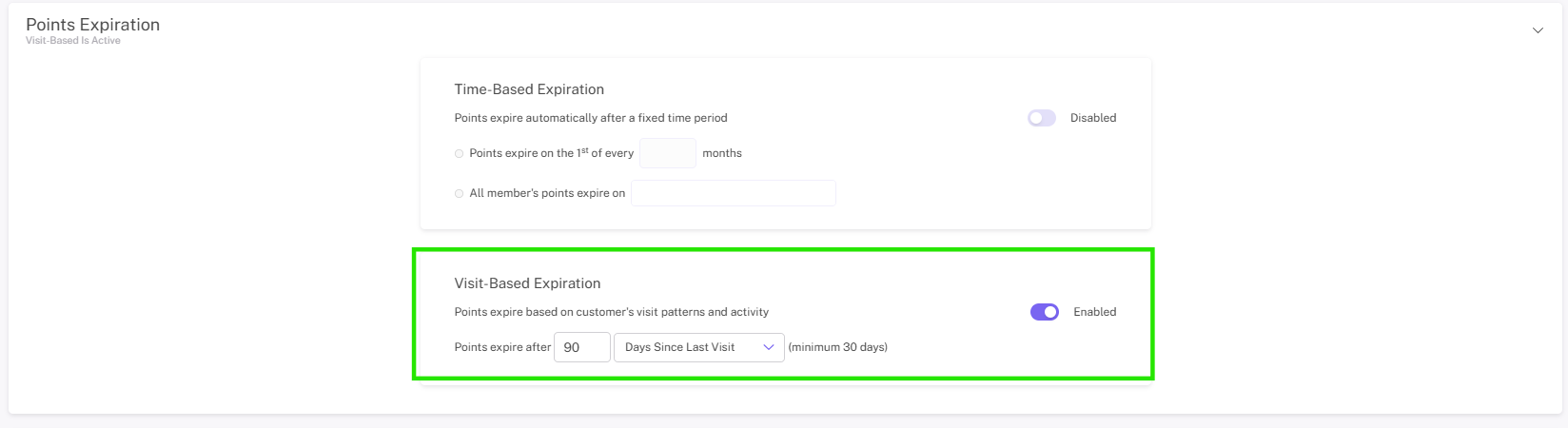
2. Number of days since visit until points removed from balance (30 days minimum).

  • Number of days since visit until points are removed from balance (30 days minimum): This option allows retailers to configure points to expire x amount of days after the members last visit.

    Days since visit = The points earned on a specific visit that happened X days ago will expire but the member will retain points earned more recently that didnt surpass X days ago
Step 3: Once you’ve configured the expiration setting the way you want, click save changes to lock in your loyalty settings!